468x60 Ads

uchu sutarya
Demo image Demo image Demo image Demo image Demo image >

Cara Memasang Widget Gambar Kamera CCTV di Blog

0 komentar

Memasang Widget Gambar Kamera CCTV di Blog

Membuat gambar kamera melayang seperti anda lihat di pojok kanan atas blog saya itu sangat mudah koq. Mau tau caranya? Agan" juga mau memasangnya di blog agan? oke saya kasih tau deh, dari pada nanti agan" nangis gak di kasih tau sama saya. hahaha PEACE gan :p


ni scriptnya:
Cara memasangnya:
1. Buka blog agan.
2. Masuk ke rancangan
3. Pilih elemen laman
4. klik Tambah Gadget
5. Pilih HTML/JavaScript
6. dan terakhir, copy script yg tadi dan paste kan di HTML/JavaScript. Lalu simpan, dan lihat hasilnya.

Gampang kan sob?

Download Spongebob Diner Dash 2: Times The Trouble

0 komentar

Download Spongebob Diner Dash 2: Times The Trouble

Genre : Action
Style : 2D Action
Themes
- Under the Sea
- Real-Life Jobs
Developer : AWE Productions, Inc.
Publisher : THQ, Inc.
=================================


Everyone’s favorite sponge is back in an all new undersea adventure and he’s in Two Times the Trouble! Help SpongeBob SquarePants and the rest of the Bikini Bottom crew save their favorite hangouts from the greedy Sharkey Two-Times. If they can’t come up with the doubloons before sunrise, the famous Krusty Krab and infamous Chum Bucket will be demolished by Sharkey and his boys to build the Clam Bar Casino and Mega Mackerel Mall. Bikini Bottom may never be the same!

SYSTEM REQUIREMENTS
Windows 98/ME/2000/XP/Vista
Pentium III 800MHz Processor
256MB RAM
20MB Hard Disk Space
DirectX 9.0c
16MB 3D Video Card
Sound Card
8X CD-ROm Drive
Mouse


                                                                        DOWNLOAD

                                                            pass : uchusutarya94.blogspot.com

Download James Cameron's Avatar The Game for pc -mediafire

1 komentar

James Cameron's Avatar The Game (PC/Eng)


James Cameron's Avatar: The Game is the official video game based on the highly anticipated film James Cameron's Avatar. The video game will take you deep into the heart of Pandora, an alien planet that is beyond imagination Gamers will encounter the Na'vi, Pandora's indigenous people and discover other life forms the likes of which have never been seen in the world of video games before. When conflict erupts between the RDA Corporation, a space-faring consortium in search of valuable resources, and the Na'vi gamers will find themselves thrust into a fight for the heart of a planet and the fate of a civilization

James Cameron's Avatar The Game - At first the player is allowed to choose the appearance of the character from a set of pre-defined faces, although not the name. After the player has chosen a side, each side the player chooses offers different gameplay, weapon set, skill set, and environment.

James Cameron's Avatar The Game - As a Soldier, the player is equipped with firearms such as assault rifles, shotguns, grenade launchers, and Flamethrowers. The soldier generally have to eliminate the enemies, which are fast and resilient and usually charging towards the player, from afar. Playing as an Avatar limits the player to only one Avatar-issued machine gun and various primitive weapons such as bows, crossbows and melee weapons. The Avatar player usually has to charge the enemies since ranged weapon are either weak (the machine gun), have slow rate of fire (bows and crossbows), or have limited ammunition; however, the human enemies are generally weak and the basic foot soldiers can die after getting hit once with one strike of a club. The environment also reacts differently to the character: many plants will attack the soldier, while the Avatar can walk past said plants unharmed. A variety of vehicles or mounts are also available to each race.

James Cameron's Avatar The Game - As the player completes mission objectives or eliminates opposition, the character gains experience points and levels up. The leveling up process is quite linear, with no way to customize the character. Each level rewards the character with better versions of the weapons, armor and skills she/he already has. The character can have only 1 armor (one type of combat gear at a time, though with higher levels, different types become available, which may be selected instead of the original), 4 skills and 4 weapons equipped into quick slot at any one time. The skills can be offensive (boost damage, summon air strikes / wild life), defensive (boost damage resistance, heal) or tactical purpose (boost speed, invisibility).

Features:
  • James Cameron’s Avatar: The Game is the official video game based on the highly anticipated film James Cameron’s Avatar. The video game will take you deep into the heart of Pandora, an alien planet that is beyond imagination.
  • Fight for you cause; RDA or Na’vi. Customize more than 60 RDA and Na’vi weapons, combined. Choose your skills: 20 for each clan. Drive all of the vehicles and ride the animals. Expand the battleground in online multiplayer. 
  • When conflict erupts between the RDA Corporation, a space-faring consortium in search of valuable resources, and the Na’vi, gamers will find themselves thrust into a fight for the heart of a planet and the fate of a civilization.
Screenshots:


Minimum System Requirements:
- OS: Microsoft Windows XP / Windows Vista /Windows 7
- CPU: Intel Pentium 4 at 3.2 Ghz / Intel Pentium D at 2.66 Ghz / AMD Athlon™ 64 3500+
- RAM: 1 GB for Windows XP / 2 GB for Windows Vista, Windows 7
- HDD: 4 GB free disk space
- Graphics: 256 MB Graphics Memory with Shader Model 3.0
- Sound Card: DirectX 9 Compatible
- DirectX: Version 9.0c
- 128 kbps Broadband connection

Recommended System Requirements:
- OS: Microsoft Windows XP / Windows Vista /Windows 7
- CPU: Intel Core 2 Duo Family / AMD Athlon™ 64 X2 5200+
- RAM: 2 GB
- HDD: 4 GB free disk space
- Graphics: 512 MB Graphics Memory with shader 3
- Sound Card: DirectX 9 Compatible
- DirectX: Version 9.0c- 256 kbps Broadband connection

PASS MEDIAFIRE : uchusutarya94.blogspot.com

Download Command & Conquer : Generals Zero Hour - Indowebster

2 komentar


Command & Conquer : Generals Zero Hour - Indowebster


Command & Conquer : Generals Zero Hour - Mediafire
Command & Conquer : Generals Zero Hour | 971.96 Mb


Platform: PC
Genre: Strategy
Developer: EA Los Angeles
Publisher: Electronic Arts
Release Date: 22 September 2003

Zero Hour fundamentally improves the core game, and it should ensure that Command & Conquer: Generals continues to be popular well into the next year.


Hardware Requirements :
System: 800 MHz Intel Pentium III or AMD Athlon processor or equivalent
RAM:128 MB RAM
CD-ROM: 8X CD-ROM
Video Memory: 32 MB VRAM
Hard Drive Space: 2750 MB
Mouse: Yes
Sound Board: Yes
DirectX: DirectX v8.1

Recommended System Requirements :
System: 1.8 GHz or faster Intel Pentium IV or AMD Athlon processor or equivalent
RAM: 256 MB RAM
3D Sound Card: Yes

Required for Multiplayer Games:
256 MB RAM for 3-8 Player Games
Internet (2-4 Players)
56.6 Kbps or faster internet connection
Internet (5-8 Players)
Cable, DSL, or a faster internet connection
Network (2-8 Players)
TCP/IP Compliant Network


pass : www.isalgames.com

Download Lego Pirates of the Caribbean - Mediafire

1 komentar

Lego Pirates of the Caribbean | 7.2 Gb


Publisher: Disney Interactive Studios | Developer: TT Games | Genre: Action | Platform: PC | 
Size: 7.223 GB | Release Date: 14-05-2011

LEGO Pirates of the Caribbean: The Video Game re-creates the action adventure and memorable moments of the Pirates of the Caribbean mythology in LEGO form, incorporating the humour of LEGO minifigures and fantastic worlds built from LEGO bricks and elements for players to explore

Players can take on the roles of more than 70 characters and experience the pirate adventure, irreverent humour and amazing creatures of the Pirates of the Caribbean films, through action-adventure gameplay and hilariously quirky LEGO cut scenes. Throughout the game, players will also have the freedom to explore environments from the highly acclaimed movie series in more than 20 levels. The game features two-player cooperative mode, in which players each control a character to experience the story together, and freeplay mode, which lets players return to levels to discover new items.

Features:
  • Experience the swashbuckling adventure, irreverent humor, memorable characters and amazing creatures of the Pirates of the Caribbean universe
  • Play as Jack Sparrow, Captain Barbossa, Davy Jones and all of your other favorite Pirates of the Caribbean characters each with their own personalities and abilities!
  • Immerse yourself in your favorite sequences from all four Pirates of The Caribbean films in an all-new way with the LEGO twist that takes players from the port of San Juan to the pirate haven of Tortuga and everywhere in-between!
  • Local Co-op play, one of the most beloved features of the LEGO video game series, returns to allow you to team up and enjoy the adventure with others!
  • Replay the story levels as different characters in Free-Play mode, and search for new areas to explore, new puzzles to solve and even buried treasure to uncover
  • All new character platform abilities from high flying sword battles at the top of a ship s mast to perilous acrobatics in assorted locales the action is taken to an all new level
  • All new transform and rebuild abilities
  • All new underwater game play expands the exploration and the adventure
  • Take control of the Black Pearl and the Flying Dutchman in all new bonus levels

Game Requirement
Minimum System Requirements
  • OS: Windows XP, Vista or Windows 7
  • CPU: 1.8 Ghz Intel Pentium 4 class or AMD Athlon
  • RAM: 512 MB
  • HDD: 7 GB free disk space
  • Graphics: 128 MB Graphics Memory
  • Sound Card: DirectX 9 Compatible
  • DirectX: Version 9
Recommended System Requirements
  • OS: Windows XP, Vista or Windows 7
  • CPU: 2.7 Ghz Intel Pentium 4 class or AMD Athlon
  • RAM: 2 GB
  • HDD: 7 GB free disk space
  • Graphics: 256 MB Graphics Memory
  • Sound Card: DirectX 9 Compatible
  • DirectX: Version 9
  • Supported Graphics Cards:
  • Minimum – 128 MB card with shader model 2
  • Recommended – NVIDIA 8800 GT or ATI Radeon HD 3870 or higher


pass mediafire: uchusutarya94.blogspot.com

Download anti virus avas for android

0 komentar

avast! Free Mobile Securityavast for android free: DOWNLOAD

Papago for Android

0 komentar

Instal Papago di Android

Aplikasi digunakan untuk bernavigasi dan sangat cocok bagi kalian yang suka jalan-jalan tapi ga tau jalan alias suka nyasar...hehehe

Berikut Screenshotnya


Kalau kalian tertarik kalian bisa mencobanya di android kalian

Berikut cara instalnya :

1. Download IND_ANDROID_X5. Download disini.Pilih tab download lalu pilih indonesia
2. Terdapat 5 part


3. Gabung kelima part tsb dengan cara taruh disatu folder dan klik kanan pada part 1 dan pilih Extract here (winrar)
4. Setelah digabung kemudian ekstrak dan akan menghasilkan folder "NaviIND"
5. Gunakan Cardreader atau kabel usb dan copy folder NaviIND ke sdcard/
6. Download Papago_X5IND.apk disini kemudian instal
7. Jalankan papago dan kalian pun sudah bisa menjelajahi indonesia

Kalian pun bisa mendownload Map Indonesia dan update ke papago.Berikut caranya :

1. Download Map Indonesia terbaru di navigasi.net atau disini
2. Instal Papago_v221_X85.exe dan secara default akan terekstrak di c:/myMaps/navigasi/Papago/X8.5/
3. Copy semua file yg ada di folder X8.5 ke sdcard/NaviInd/Maps/INDONESIA/
4. Selesai dan peta pun sudah terupdate

Semoga Bermanfaat

Menjalankan Windows 95 di Android

0 komentar

Menjalankan Windows 95 di Android

Hardware smartphone sekarang memang lebih powerfull jika dibandingkan dengan spesifikasi hardware komputer pada 10-15 tahun yang lalu sehingga memungkinkan untuk menginstal OS seperti Windows 95


Untuk menjalankan windows 95 caranya sangat mudah. Berikut caranya :

1. Download qemu95eng.rar di sini
2. Ektrak qemu95eng.rar
3. Pindahkan SDLapp.apk ke sdcard
4. Pindahkan folder SDL ke root sdcard
5. Instal SDLapp.apk
6. Tunggu booting windows kurang lebih 20-30 detik
7. Windows 95 siap digunakan

Sekedar informasi bahwa kita tidak bisa menginstal aplikasi dan berinternet didalam win 95

Cara memindahkan aplikasi ke SD card / Kartu memory tanpa harus ROOT

0 komentar

Cara memindahkan aplikasi ke SD card / Kartu memory tanpa harus ROOT
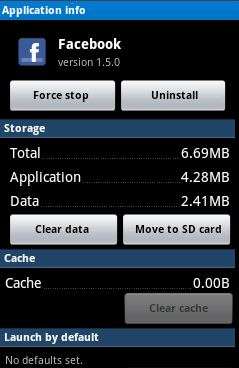
Teman teman tentu tahu kalau Android memiliki ribuan aplikasi untuk siap didownload kapan saja. Hanya saja mungkin yang menjadi kendala kita adalah kapasitas penyimpanan di memory internal sangat lah terbatas. Memang sejak up grade ke Froyo, sudah bisa dilakukannya pemindahan aplikasi ke external memory . Banyak aplikasi gratisan yang menyediakan kemampuan untuk memindahakan aplikasi aplikasi tersebut ke external memory. Tapi sayang nya tidak semua aplikasi itu bisa dipindahkan.seperti yang tertera di images berikut ini
 Ada memang cara yang paling ampuh untuk benar benar melakukan itu semua yaitu dengan di root terlebih dahulu, artinya kita bisa masuk kedalam sistem dan merubah sesuai keinginan kita, termasuk menghapus aplikasi bawaan HH. Tapi resikonya adalah garaansi resmi akan hilang, nTapi tenang saja Root bisa dikembalikan seperti semula dengan meng un root, maka HH akan seperti semula. Tapi hati hati saat sudah di root dan mendelete beberapa aplikasi , jangan sampai aplikasi krusial jadi didelete seperti sistem  , kamera atau video...hancur minah..
Melakukan pemindahan aplikasi dari internal memory ke external memory ternyata bisa dilakukan tanpa harus di root terlebih dahulu.
dengan menggunakan program SDK Android yang dapat di download secara gratis di situs Android Developer, dengan melakukan beberapa perintah dalam mode debug. Namun perlu dicatat bahwa dalam metode SDK ini tidak serta merta dapat memuat semua aplikasi tanpa batas, namun cara ini hanya mengkompresi jumlah data yang diinstal di memori internal. Pada dasarnya ada beberapa aplikasi yang pada pengaturan aplikasi dapat dipindahkan ke SDcard namun ada pula aplikasi yang tidak dapat dipindahkan

Read more at: http://ari-android.blogspot.com/2011/12/tips-dan-triks-cara-memindahkan.html
Copyright ari-android.blogspot.com Under Common Share Alike Atribution
Caranya  dengan menggunakan program SDK Android yang dapat di download secara gratis di situs Android Developer, dengan melakukan beberapa perintah dalam mode debug. Namun perlu dicatat bahwa dalam metode SDK ini tidak serta merta dapat memuat semua aplikasi tanpa batas, namun cara ini hanya mengkompresi jumlah data yang diinstal di memori internal. Pada dasarnya ada beberapa aplikasi yang pada pengaturan aplikasi dapat dipindahkan ke SDcard namun ada pula aplikasi yang tidak dapat dipindahkan, karena terhalang oleh tombol "move to sd card" yang tidak respon.
Sehingga untuk mengubah default "move to sd card" kita menggunakan program SDK Android,
Berikut tutorial singkat untuk mengubahnya :
Persiapan :
1. Pastikan Driver Perangkat Android anda sudah terinstal di PC, misalnya Samsung Kies pada android Samsung, hal ini untuk memudahkan PC mengenali perangkat anda di sistem.
2. Sediakan Kabel Data untuk menghubungkan perangkat android ke PC, yang tentunya harus di set dulu ke Debug USB.
3. Instal terlebih dahulu program SDK Android dari situs Android Developer, sesuaikan dengan OS PC anda, pihak Android.Inc menyediakannya secara gratis cekidot di sini

Caranya : 
1. Ekstrak file yang sudah di download, kemudian jalankan sdkmanager.exe (ada pada folder android-sdk-windows yang sebelumnya di ekstrak) > kemudian pilih komponen yang akan diinstall, terdapat banyak komponen namun cukup install 4 komponen utama dengan nama Android SDK Tools, Android SDK Platform Tools, SDK Platform Android 2.2 (sesuaikan dengan versi android anda) serta sample for SDK API 8, sehingga ketika proses instalasi yang mengharuskan kita mendownload komponen tersebut selesai akan terlihat seperti di bawah ini.
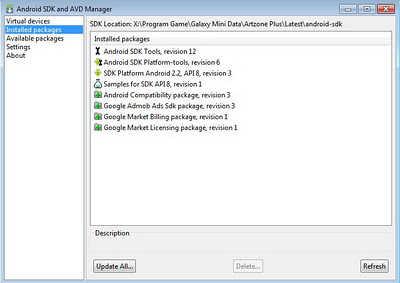
1. Ekstrak file yang sudah di download, kemudian jalankan sdkmanager.exe (ada pada folder android-sdk-windows yang sebelumnya di ekstrak) > kemudian pilih komponen yang akan diinstall, terdapat banyak komponen namun cukup install 4 komponen utama dengan nama Android SDK Tools, Android SDK Platform Tools, SDK Platform Android 2.2 (sesuaikan dengan versi android anda) serta sample for SDK API 8, sehingga ketika proses instalasi yang mengharuskan kita mendownload komponen tersebut selesai akan terlihat seperti di bawah ini.

Read more at: http://ari-android.blogspot.com/2011/12/tips-dan-triks-cara-memindahkan.html
Copyright ari-android.blogspot.com Under Common Share Alike Atribution
2. Setelah SDK Manager selesai dipasang, kemudian buka Command Prompt pada Windows (untuk masuk ke Command Prompt, klik Start - All Programs - Accessories - Command Prompt), hal ini dilakukan untuk memasuki folder platform tools pada SDK Manager, Kemudian ketik perintah berikut pada command prompt, - Ketik D: (note : sesuaikan dengan partisi hardisk tempat anda menginstal SDK, saya sendiri menginstallnya langsung di Partisi D), hingga kemudian dibawahnya muncul D:\> - Kemudian ketik lagi D:\>CD\android-sdk\platform-tools, hingga akhirnya muncul dibawahnya D:\>CD\android-sdk\platform-tools>

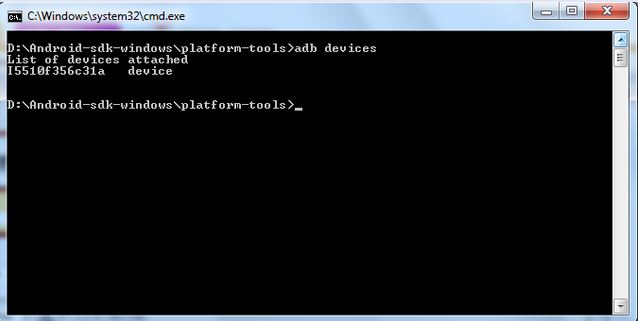
3.  Setelah itu masuk ke Cmd.exe pada Windows (klik C:\Windows\system32\cmd.exe) dan ketik perintah adb devices untuk memastikan bahwa perangkat android telah benar-benar terhubung, jika telah terhubung akan tampak seperti dibawah ini

4. Kemudian masih pada program Cmd.exe, ketik perintah adb shell pm setInstallLocation 2 (perhatikan caps lock), yang merupakan langkah akhir yang akan mengganti default penyimpanan aplikasi terinstal ke memori eksternal (SDcard).
dengan menggunakan program SDK Android yang dapat di download secara gratis di situs Android Developer, dengan melakukan beberapa perintah dalam mode debug. Namun perlu dicatat bahwa dalam metode SDK ini tidak serta merta dapat memuat semua aplikasi tanpa batas, namun cara ini hanya mengkompresi jumlah data yang diinstal di memori internal. Pada dasarnya ada beberapa aplikasi yang pada pengaturan aplikasi dapat dipindahkan ke SDcard namun ada pula aplikasi yang tidak dapat dipindahkan

Read more at: http://ari-android.blogspot.com/2011/12/tips-dan-triks-cara-memindahkan.html
Copyright ari-android.blogspot.com Under Common Share Alike Atribution
5. Setelah proses selesai maka aplikasi yang sebelumnya tidak dapat di pindah ke SDcard karena tombol tidak aktif tadi akan menjadi aktif, seperti di bawah ini.
Setelah semua step ini dilakukan, secara otomatis untuk setiap aplikasi yang kita install akan masuk ke memory eksternal, tapi ingat tidak 100 % masuk ke memory eksternal , 1- 2 % masih tetap ada di memory internal . sebagai contoh . untuk game Chiken running yang besarnya 18 MB , setelah di instal maka file yang masuk ke memory eksternal sebesar 17 MB , sisanya 1 Mb masih di internal memory .
 
Lumayan dari pada lu manyun WKWKWKWKWKWKWKWKWKWKKW
Cara memindahkan aplikasi ke SD card / Kartu memory tanpa harus ROOT

DOWNLOAD GAME SONIC THE HEDGEHOG 4 FOR ANDROID

0 komentar

IE Sonic The Hedgehog 4 episode 1 untuk android


Siapa yang tidak kenal game Adventures satu ini, Sonic  si landak. Game konsol yang sangat terkenal ini sekarang juga bisa dimainkan di android kita. Grafis nya sama seperti saat kita main di konsol. Meriah dengan warna.
Game play sama seperti ciri khas game game sonic lainnya.
Game full 2&3D dimensi ini sangat asik dimainkan,

Link  : media fire
Download APK disini
Download Data disini

instal .apk and simpan data nya di SD/Android/data/com.sega.sonic4epi/

enjoy


DOWNLOAD GAME PES2012 FOR ANDROID

0 komentar

Download game PES 2012 untuk android


Download game PES 2012
Gameplay nya lebih bagus dibandingkan PES 2011


Link Mediafire


cara :
1.instal .apk
2.extract .rar ke Android/data/ 

jual DVD game murah

0 komentar

Rp 5.000 / DVD KOLEKSI BARU


Pembayaran via btn,bri


GAME AKAN SELALU DIUPDATE
Download List Game UPDATE 18-06-2012 :

Code:
http://www.4shared.com/file/k7FEC5ia/Update_18-06-2012.html
Cara Pemesanan:
  • Nama agan / Nama penerima barang
  • Cantumkan alamat yang komplit... RT/RW, KECAMATAN, KELURAHAN, KODE POS
  • Cantumkan no telp, kalo bisa HP
  • Pilih Bank yg dipake bri or btn
  • NO COD / Ketemuan / Barang Dijemput
  • Pengiriman hanya lewat jasa JNE
  • Tidak terima Request game
  • Jangan Order game yg tidak ada di list game, semua koleksi game ane cuma yg ada di dalam list game saja
  • Ketik judul game yg lengkap, terutama untuk game yg versi / serinya banyak
  • Ane tidak bertanggung jawab jika sampai terjadi salah kirim game karena kesalahan 2 point diatas


No Telp Ane ada di dalam list game, dan hanya ane gunakan untuk terima sms pemesanan, konfirmasi transfer saja, selain itu tidak akan direspon
Untuk order dan tanya2 bisa lwt sms atau Email


Garansi 1 minggu untuk pemesanan sampai 10 dvd
Garansi 2 minggu untuk pemesanan sampai 20 dvd
Begitu seterusnya sampai maksimal garansi 1 bulan
Garansi hanya berlaku jika hasil burn tidak sempurna / Corrupt, kirimkan screenshotnya atau kirimkan foto yang gagal untuk klaim garansi
Cara paling mudah untuk mengetahui klo hasil burn gagal adalah cukup dicopy ke harddisk , klo berhasil dicopy berarti bebas garansi
Garansi dikirim di next order atau akan langsung dikirim jika agan mau bayar ongkirnya

Saya akan memberikan 2 angka unik dibelakang jumlah transferan
Misalnya total transfer 50.000, maka saya minta transfer 50.011

No Resi ane kirim via SMS or email
Ane biasa Update Resi agak malem, atau besok pagi (kalau ketiduran )